brillienta Book a demo ↗

HOME / SERVICES / MICROSOFT 365

✳ MICROSOFT 365 DEVELOPMENT & CONSULTING

Custom Microsoft 365, built by product engineers.

We design and build SharePoint, Teams, Copilot and Power Platform solutions — with the same engineering we put into six shipped Microsoft 365 products: schema as code, least-privilege access, repeatable deployment, tests and documentation.

SharePoint & SPFxweb parts, extensions, intranets
Teams & Copilotapps, tabs, bots and agents
Power Platformflows, apps and reports
Graph & Entra IDintegrations and sync
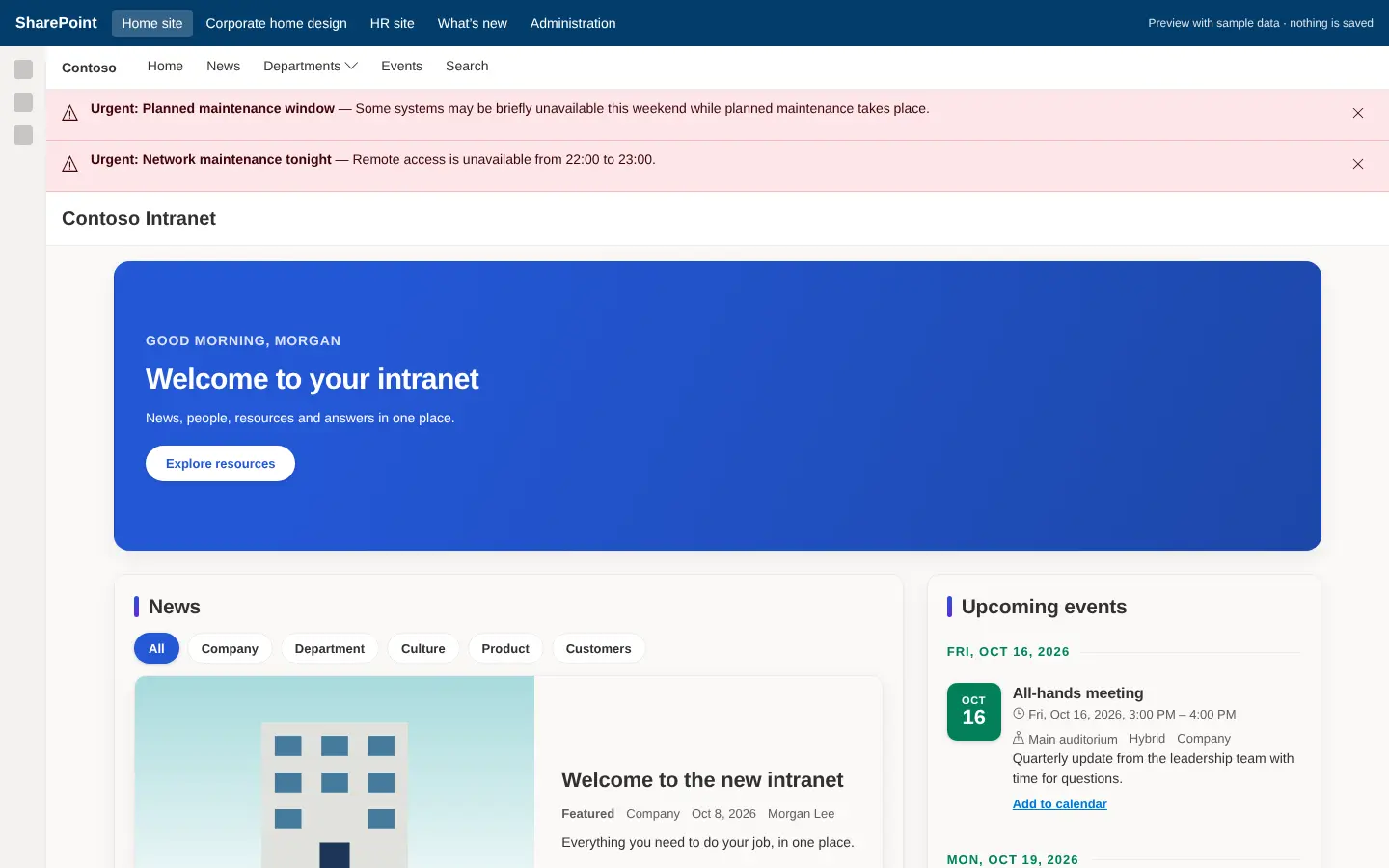
contoso.sharepoint.com/sites/intranet-admin
An intranet home site built with Intranet Builder: navigation, alerts, welcome hero, news and events

Built by us: an intranet home site provisioned by Intranet Builder — 39 SPFx web parts, 9 extensions.

01 / WHAT WE DO

Everything you need
from Microsoft 365.

Pick one service or combine them. Every engagement starts from the business problem, not the technology.

SP

SharePoint & SPFx development

Custom web parts, extensions and list solutions that look native and respect SharePoint permissions.

  • SPFx web parts and property panes
  • Application customizers, command sets, field customizers
  • List and library solutions with forms, views and validation
  • PnP provisioning templates and site scripts
IN

Intranets & employee portals

Modern intranets your people open every day — designed, provisioned and governed properly.

  • Home, hub, department, HR and knowledge sites
  • Navigation, branding, audience targeting
  • Viva Connections and Teams integration
  • Accelerated with Intranet Builder
TM

Microsoft Teams apps

Bring your processes to where people already talk and meet.

  • Tabs and personal apps
  • Bots and message extensions
  • Adaptive Card notifications and approvals
  • Channel automation and provisioning
AI

Copilot & AI agents

Agents that answer from approved sources and act with the user’s own permissions.

  • Declarative agents for Microsoft 365 Copilot
  • Copilot Studio agents and actions
  • Azure OpenAI features inside your apps
  • Copilot readiness: permissions and oversharing review
PP

Power Platform

Automation and apps that business teams can own after we hand over.

  • Power Automate approval and notification flows
  • Power Apps canvas and model-driven apps
  • Power BI reports on SharePoint and Dataverse data
  • Flow packaging, service accounts and monitoring
GR

Microsoft Graph & integrations

Connect Microsoft 365 to the systems that run the rest of your business.

  • Entra ID users, managers and photos sync
  • Intune devices, Planner, Outlook, Azure DevOps
  • HR, ERP and finance system integrations via approved APIs
  • Azure Functions with managed identities where a server is needed
MG

Migration & modernisation

Move content and retire legacy tools without losing structure, metadata or trust.

  • File shares and other platforms to SharePoint and OneDrive
  • Classic to modern SharePoint
  • InfoPath and SharePoint Designer workflow replacement
  • Spreadsheet-to-app conversions with data cleansing
GV

Governance, security & admin

A tenant that stays tidy, secure and audit-ready as it grows.

  • Tenant and SharePoint permissions assessment
  • Site lifecycle, guest access and naming policies
  • Sensitivity labels and retention alignment
  • Admin runbooks and PowerShell automation
B

Brillienta product tailoring

Already using one of our products — or close to it? We extend it for the way you work.

  • Extra modules, fields and reports
  • Integrations with your line-of-business systems
  • Data migration from your current tool
  • Rollout, training and admin handover

IN DEPTH

Specialist services.

Each service has its own page with capabilities, architecture, typical solutions and answers to common questions.

02 / HOW WE BUILD

The habits behind
our own products.

Everything below is how the Brillienta products are made — and how we build for clients.

Provisioning you can run twice

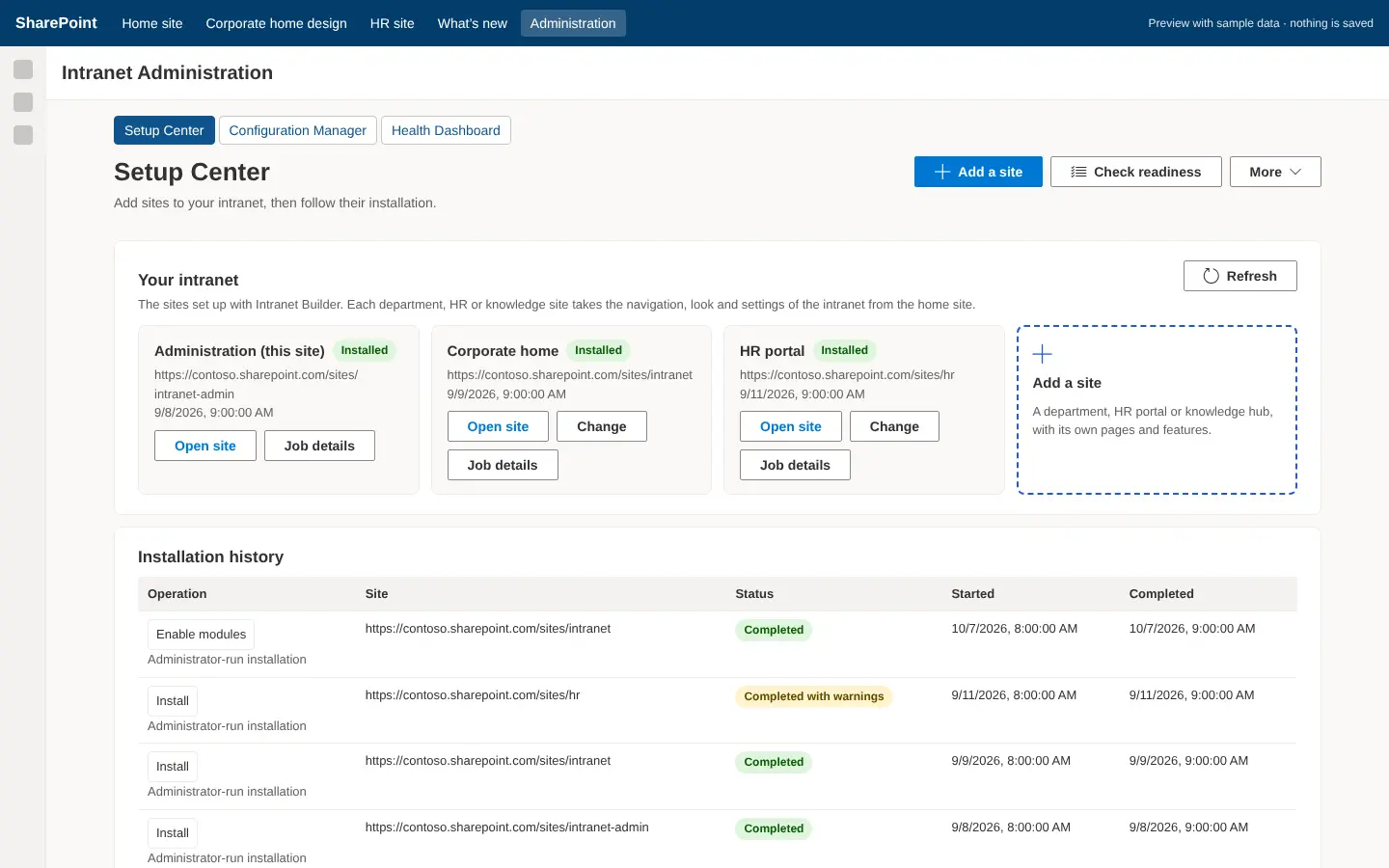
Intranet Builder’s PowerShell engine validates, plans, applies and verifies every change. Installations are idempotent and resumable; a change preview shows each creation, update and conflict before anything is touched. We bring the same approach to client deployments.

  • Configuration as versioned JSON, not click-paths
  • Health checks that detect drift and print the repair
Intranet Builder Setup Center listing recent provisioning jobs and their status

Least privilege, by default

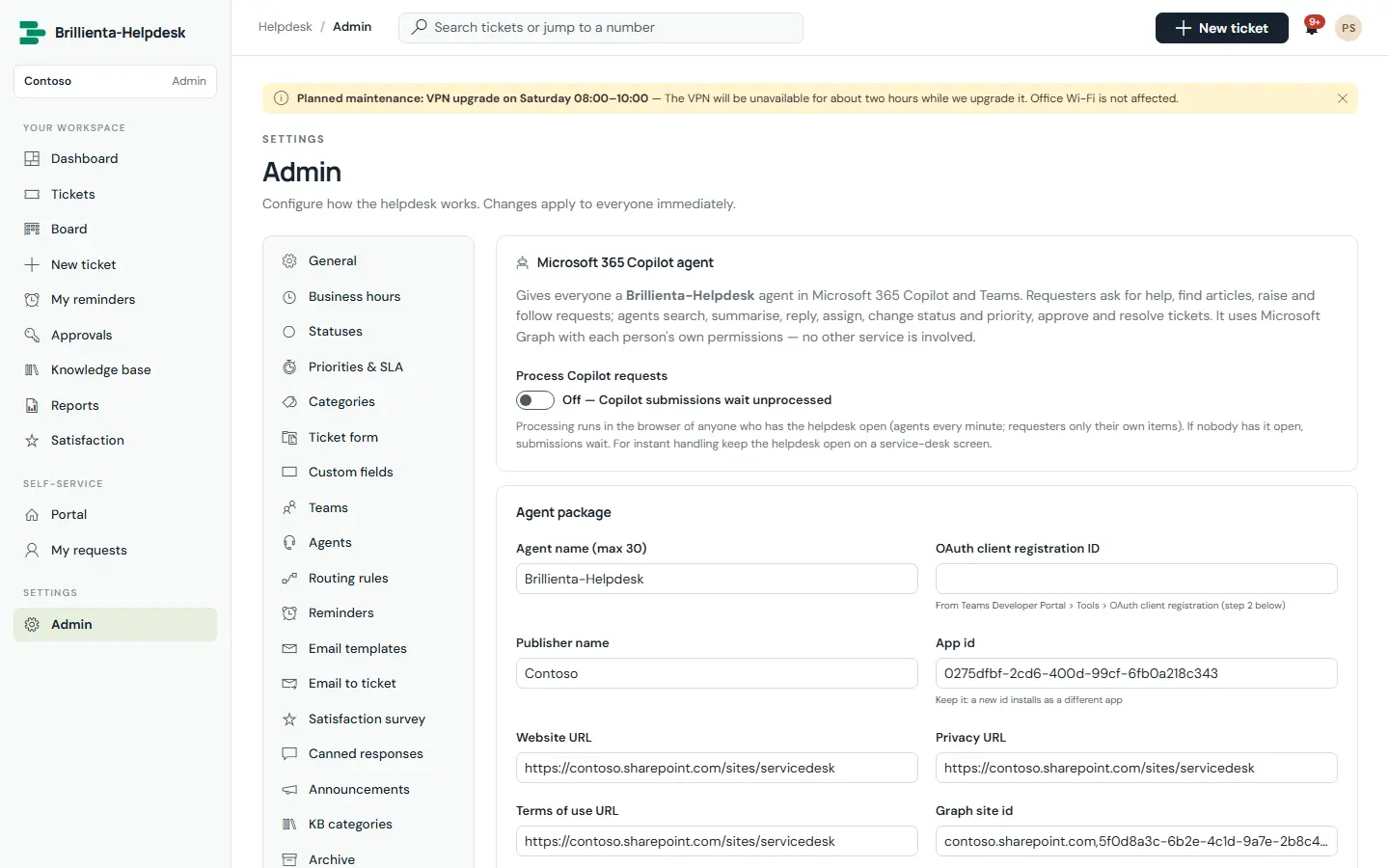
Our apps act as the signed-in person and request Graph permissions only for the features that need them. Helpdesk needs none at all — its Copilot agent queues changes that execute with the requester’s own rights.

  • SharePoint groups and per-list security profiles
  • Verified writes: approvals checked against version history
Helpdesk Copilot agent builder in five checked steps
Schema as codeApps create, check and repair their own lists. Upgrades only add.
TestedType-checked builds, unit tests and browser tests at desktop and phone sizes.
ConfigurableSettings in admin pages with validation, so your team changes behaviour — not us.
DocumentedEvery delivery ships with an admin and user guide — like these.

03 / WAYS TO ENGAGE

Start small.
Scale when it works.

Fixed scope where it can be, flexible where it must be. We’ll recommend the lightest option that solves the problem.

CONSULTING

Assessment

Fixed scope · typically 1–3 weeks

Tenant, intranet, Copilot-readiness or process review. You get findings, a prioritised roadmap and estimates.

Ask about an assessment
DELIVERY

Project build

Fixed-scope phases

A defined solution — web part, Teams app, agent, intranet or migration — delivered in phases with a working release at the end of each.

Scope a project ↗
CAPACITY

Dedicated team

Monthly · developers + lead

Microsoft 365 engineers working inside your backlog and rituals, for roadmaps that keep evolving.

Discuss a team
AFTER LAUNCH

Support & care

Monthly retainer

Fixes, small changes, Microsoft 365 platform updates and admin help for solutions we — or others — built.

Ask about support

04 / HOW A PROJECT RUNS

Four stages.
Each with an output.

You see working software early, and you always know what happens next.

Discover

Workshops with the people who do the work. Output: requirements, success measures, tenant constraints and an estimate.

Design

Information architecture, permissions, screens and integration design. Output: clickable prototype and a fixed plan.

Build & test

Short iterations with demos on your tenant. Output: tested, packaged releases with deployment scripts.

Launch & hand over

Rollout, training and admin guides. Output: a solution your team can run — with support if you want it.

SharePoint FrameworkReact & TypeScriptMicrosoft GraphTeams Toolkit Copilot StudioPower AutomatePower AppsPower BI PnP PowerShellAzure FunctionsEntra ID

CONSULTING QUESTIONS

Before you
get in touch.

Talk to a consultant ↗
Do we need a Brillienta product to work with you?

No. Most consulting work is independent of our products. Where a product fits, we’ll say so — it is often faster and cheaper than building from scratch.

Will you work with our IT team and existing partners?

Yes. We work within your change process, security reviews and admin boundaries, and document everything we deploy so your team can take it over.

Where will our data live?

In your tenant by default — SharePoint, Dataverse or your own Azure subscription. If a design needs an external service, we say so up front and agree it with you.

Who owns what you build?

You do. Source code, deployment scripts and admin guides for bespoke work are handed over as part of the engagement. Brillienta products you use stay licensed products.

Can you fix or extend something another partner built?

Usually. We start with a short review of the existing solution, then recommend whether to extend, refactor or replace it.

How do you estimate?

After discovery we give a fixed price per phase where the scope is clear, or a capacity-based estimate where it is still evolving.

✳

TELL US THE PROBLEM

We’ll tell you honestly
how Microsoft 365 can solve it.

Book a consultation ↗