One register, cradle to grave
Purchase, assignment, loans, maintenance, audits, contracts and disposal on one asset page with full history.
 brillienta
Book a demo ↗
brillienta
Book a demo ↗
HOME / PRODUCTS / ASSET MANAGEMENT
IT ASSETS · VERSION 1.0
Track every asset from purchase to disposal — assignments, loans, receipt confirmations, requests and approvals, maintenance, audits, contracts, depreciation and Intune device sync — with email and reminders delivered by Power Automate flows in your own tenant.
From $29 / month · 14-day free trial of every feature
WHY ASSET MANAGEMENT
Purchase, assignment, loans, maintenance, audits, contracts and disposal on one asset page with full history.
Confirmations, requests and problem reports arrive structured and verified — no spreadsheets.
Manager approvals are verified against SharePoint version history before anything is handed out.
Intune and Entra ID devices flow into the register daily, matched and assigned automatically.
FEATURES
The tags show who uses each feature and the lowest plan that includes it. Every screen is the real product with fictional demo data.
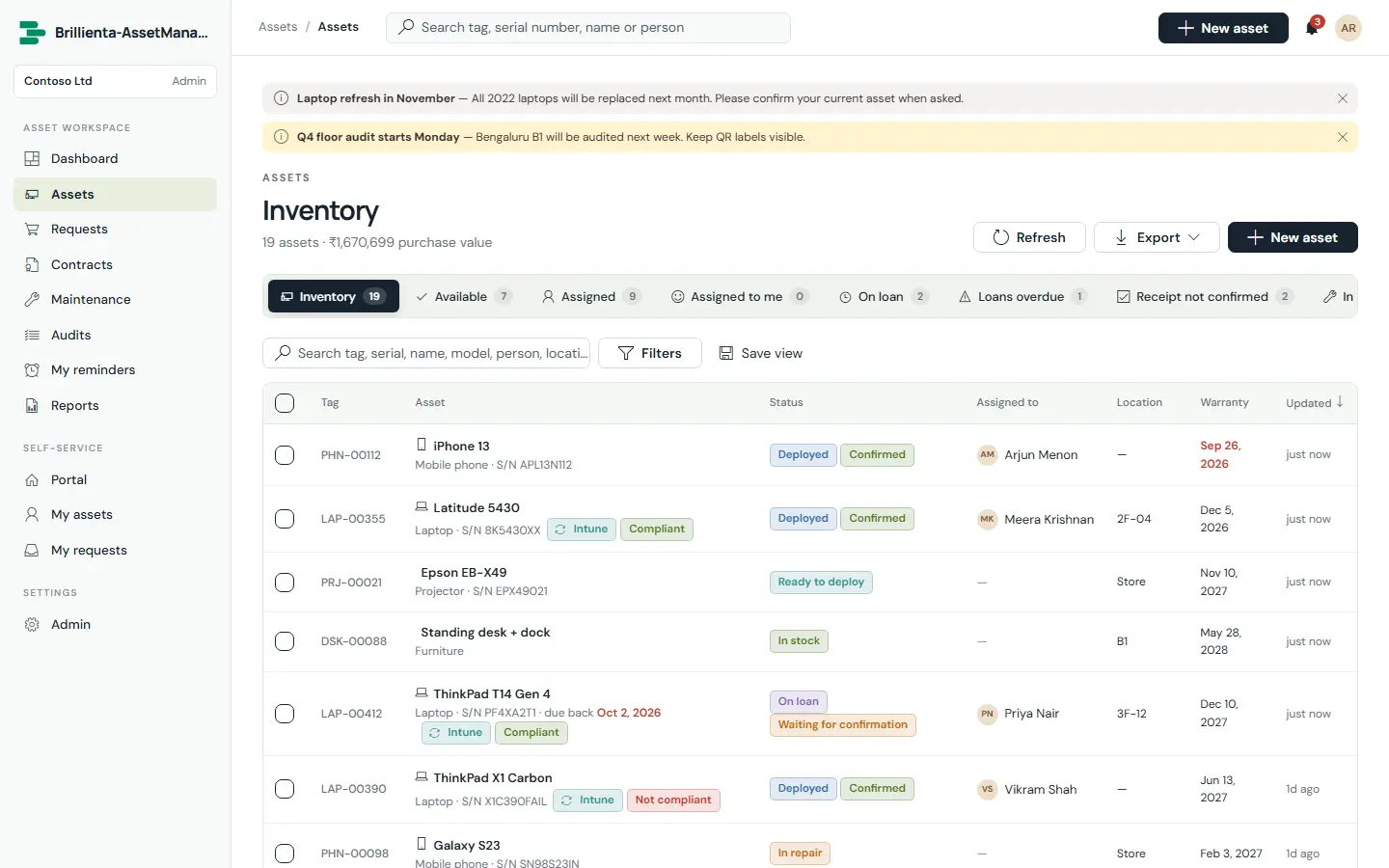
Asset types with tag prefixes, depreciation, audit and maintenance intervals; nested locations, vendors and custom fields per type. Built-in views — inventory, available, assigned, mine, on loan, loans overdue, receipt not confirmed, in maintenance, warranty ending, audit due, retired, disposed and lost — plus saved views, filters, bulk actions and Excel/PDF export.
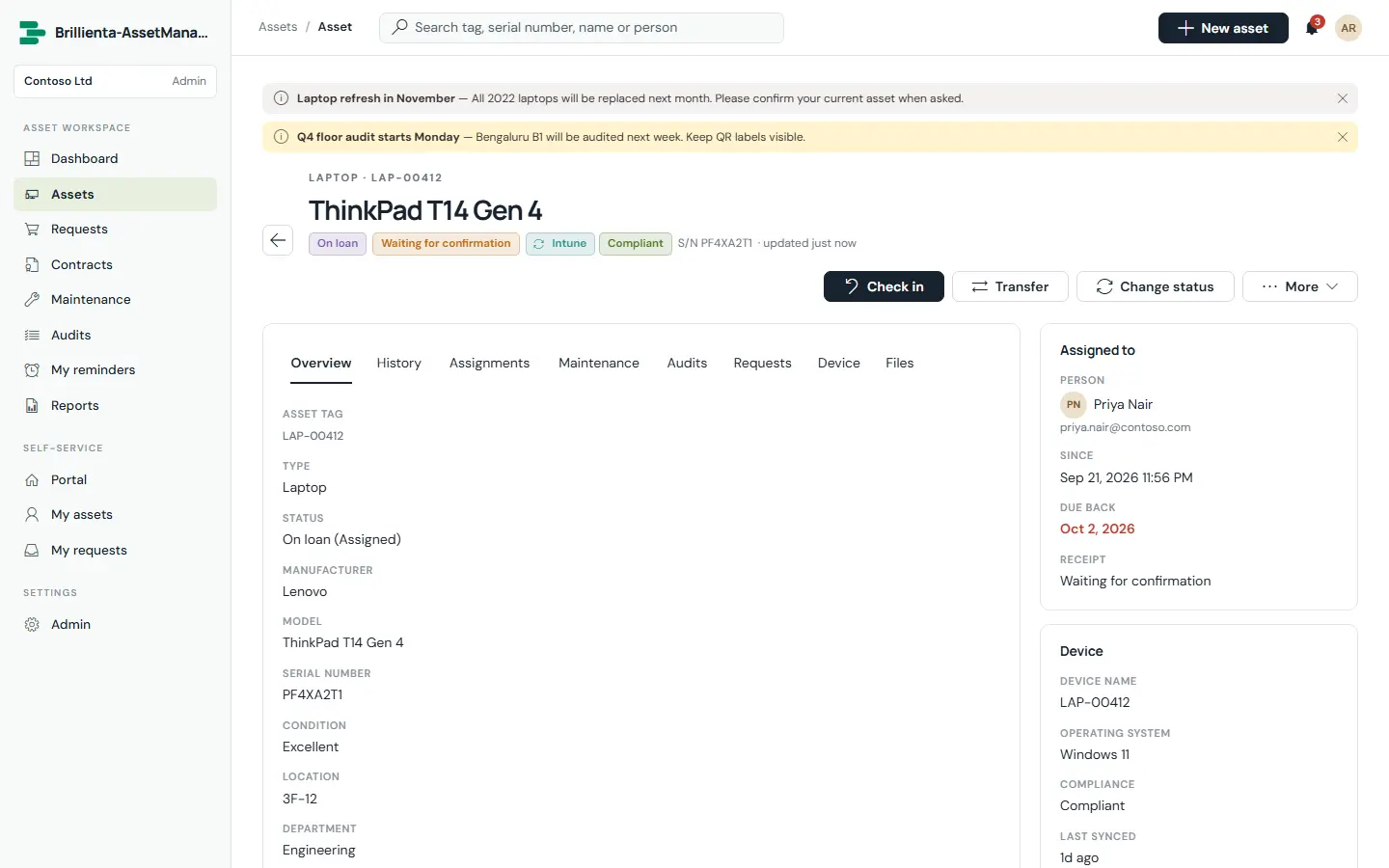
Details — assignee, due-back date, location, purchase, book value, device compliance and QR label — beside the full custody and change history. Check out, transfer, check in, start maintenance, change status, print labels or set a personal reminder from one place.
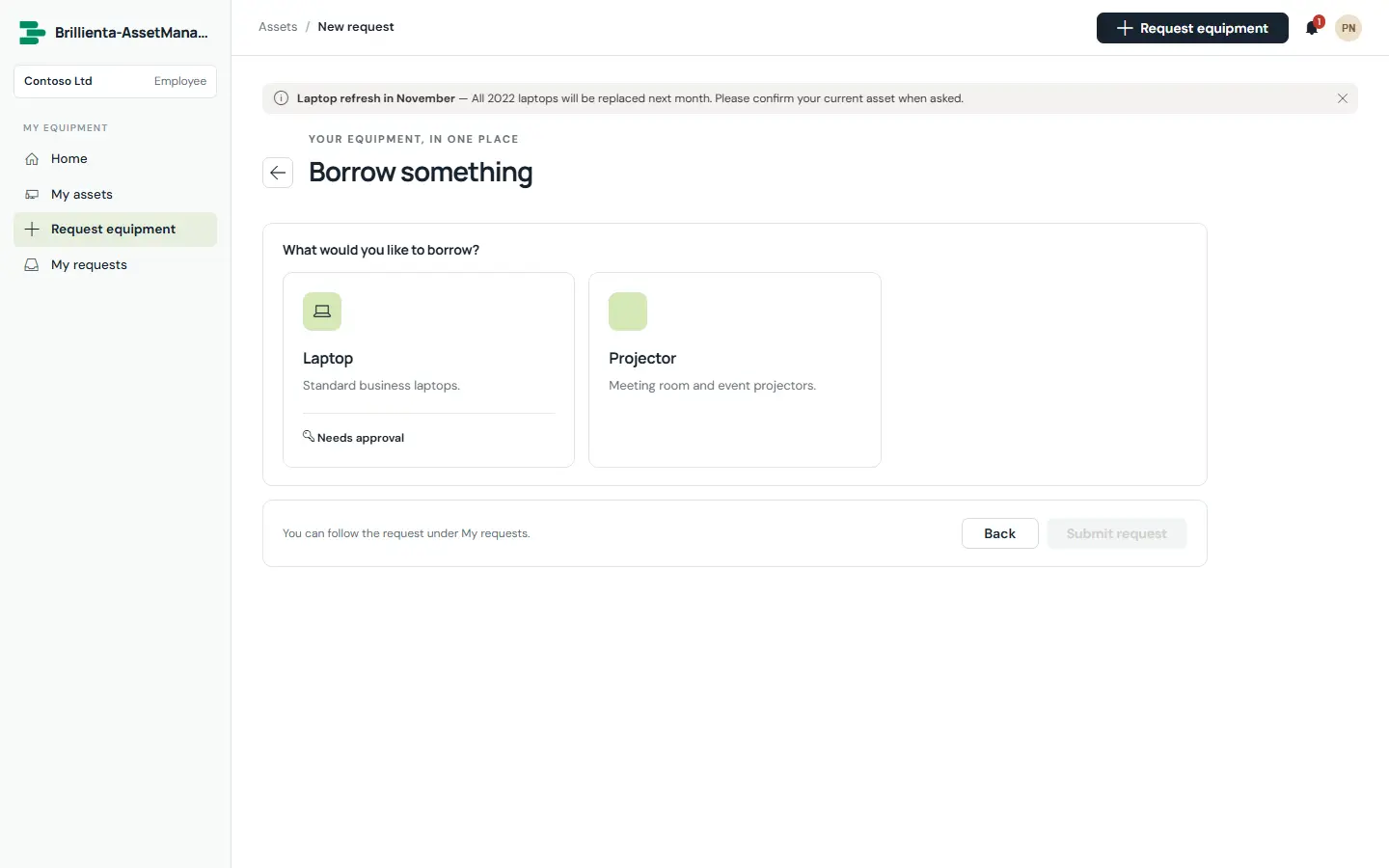
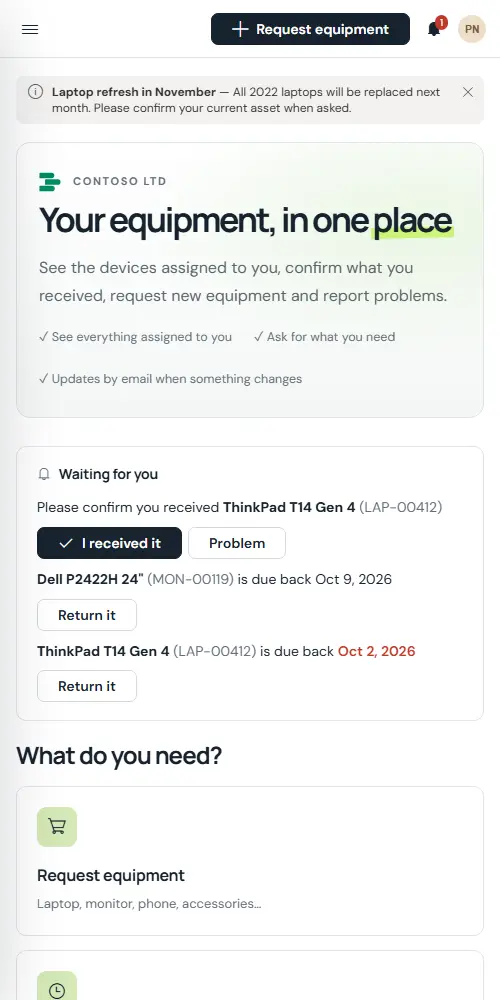
The branded home for every employee: a “Waiting for you” card (confirmations, loans due, approvals), request tiles (new, loan, issue, return), my equipment and my open requests. Scanning an asset’s QR label shows full details for the employee’s own assets.
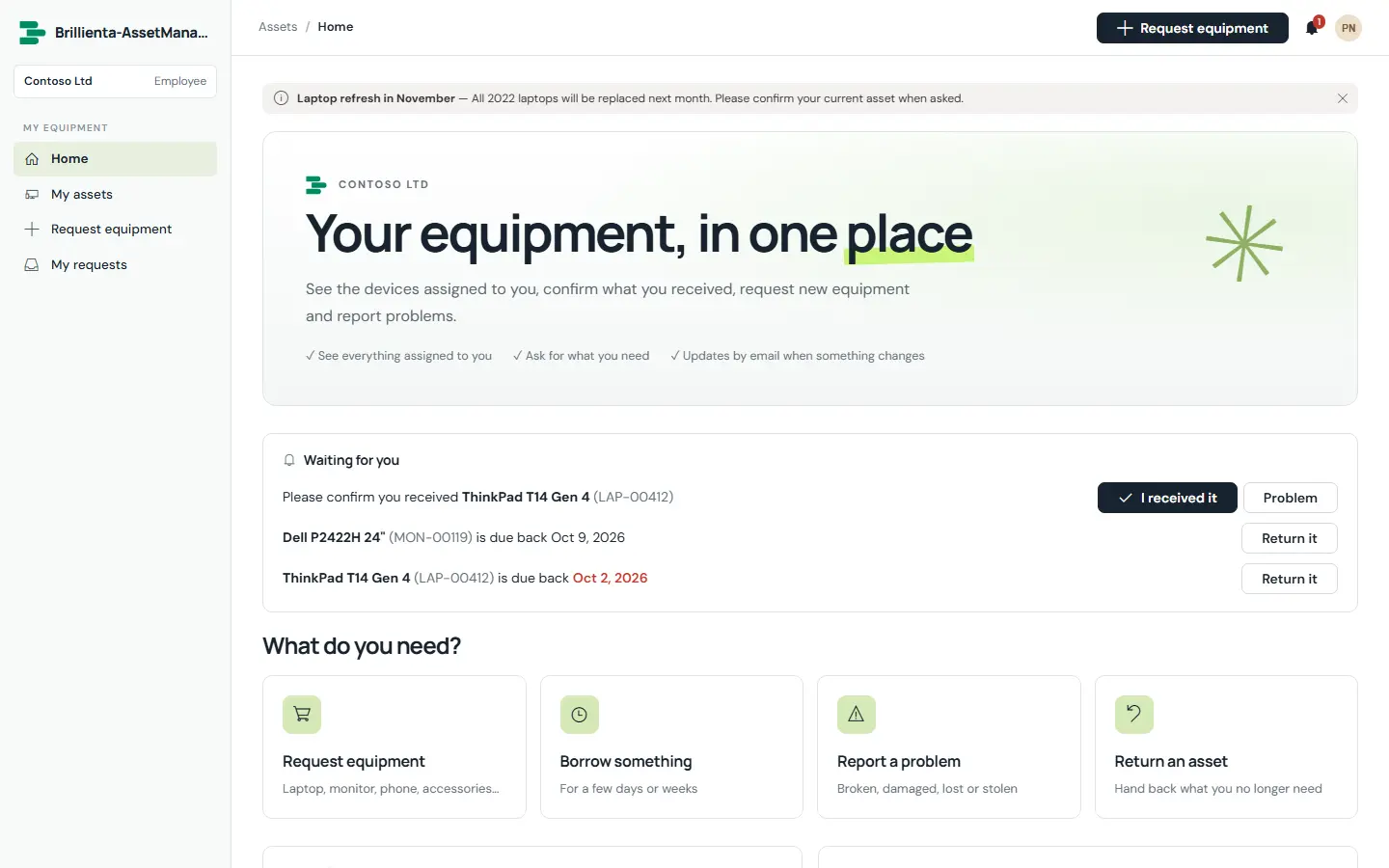
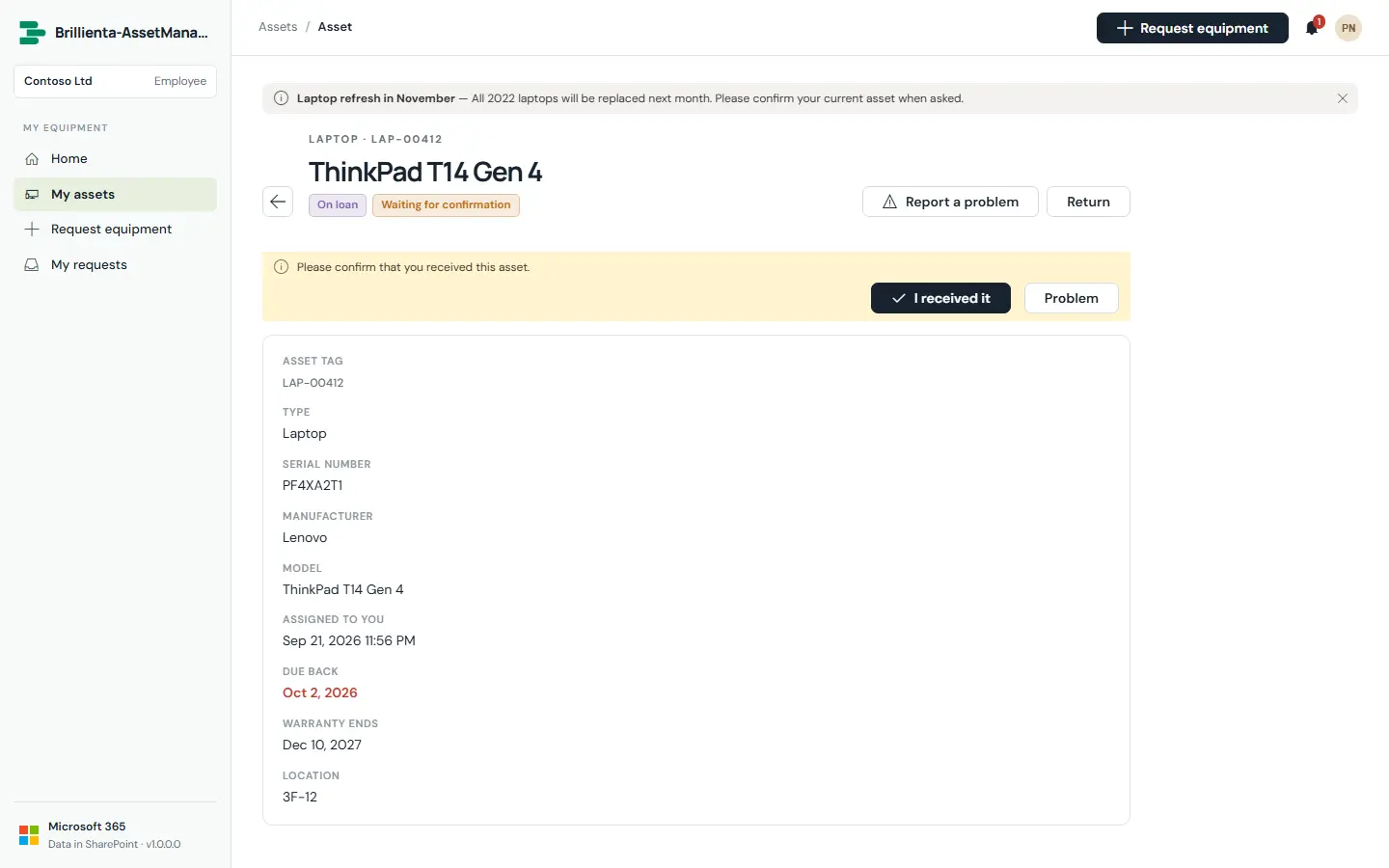
When a type requires it, the assignee confirms they received the asset — or reports a problem. Disputes alert the asset team immediately, and reminders chase unconfirmed receipts until they are answered.
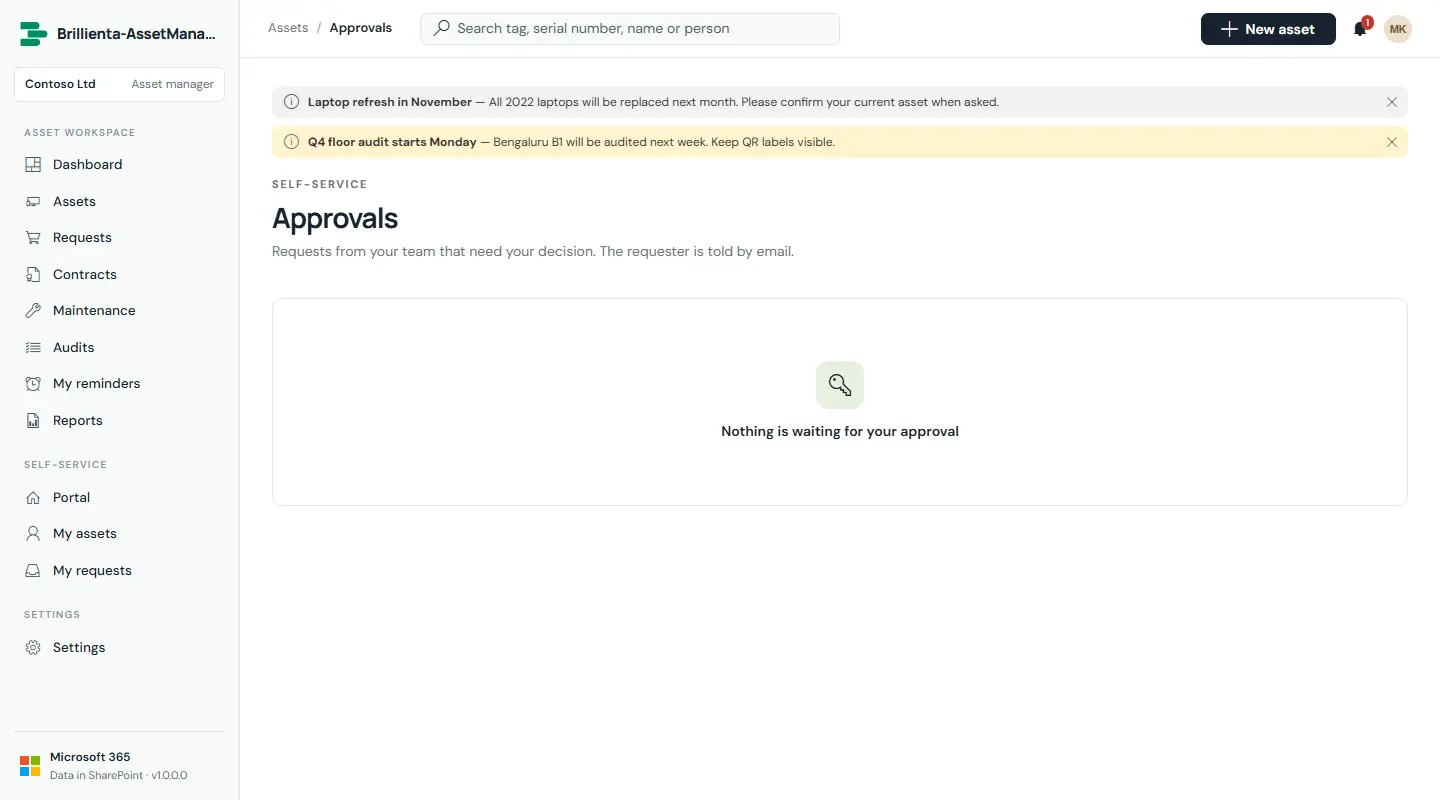
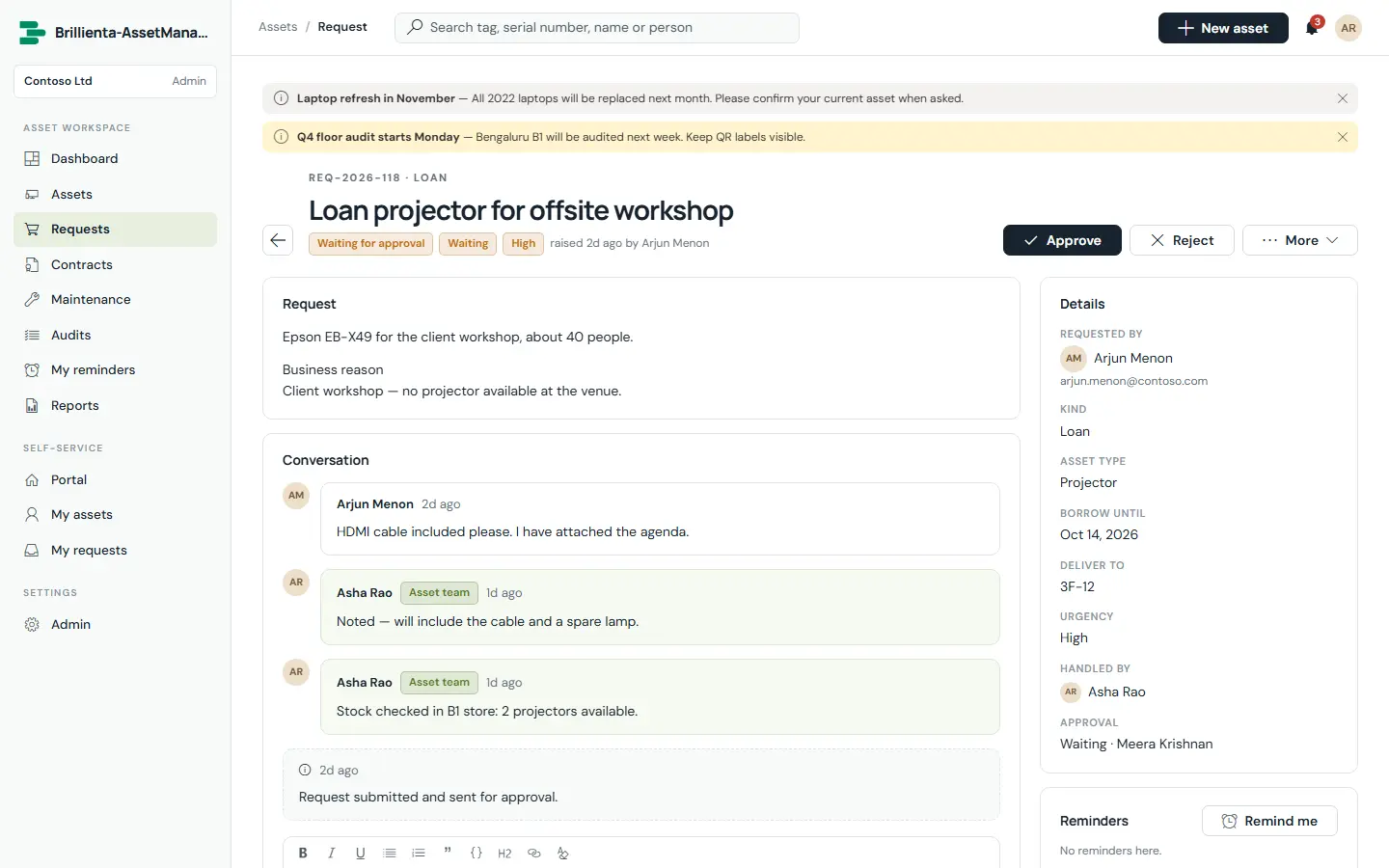
Five kinds — New, Loan, Replacement, Return, Issue — with business reason, dates and files. The asset team triages them in views; approval goes to the requester’s manager or a named person, and fulfilment hands out an asset, takes one back or starts a repair in a single step.
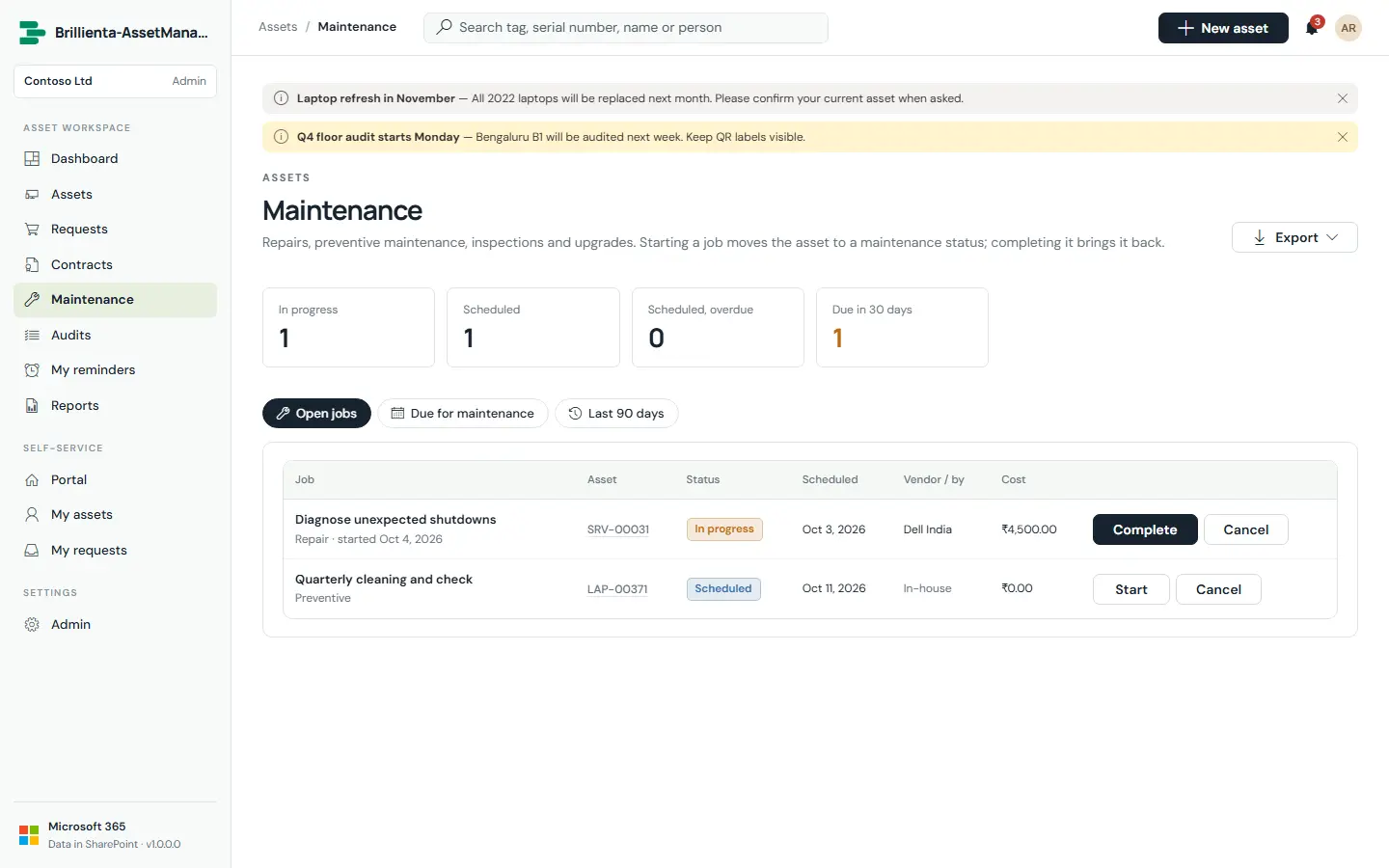
Repairs, preventive maintenance, inspections, upgrades and calibration. Open jobs, assets due in the next 30 days and the last 90 days; completing a job records cost, condition and outcome and rolls the next-due date forward.
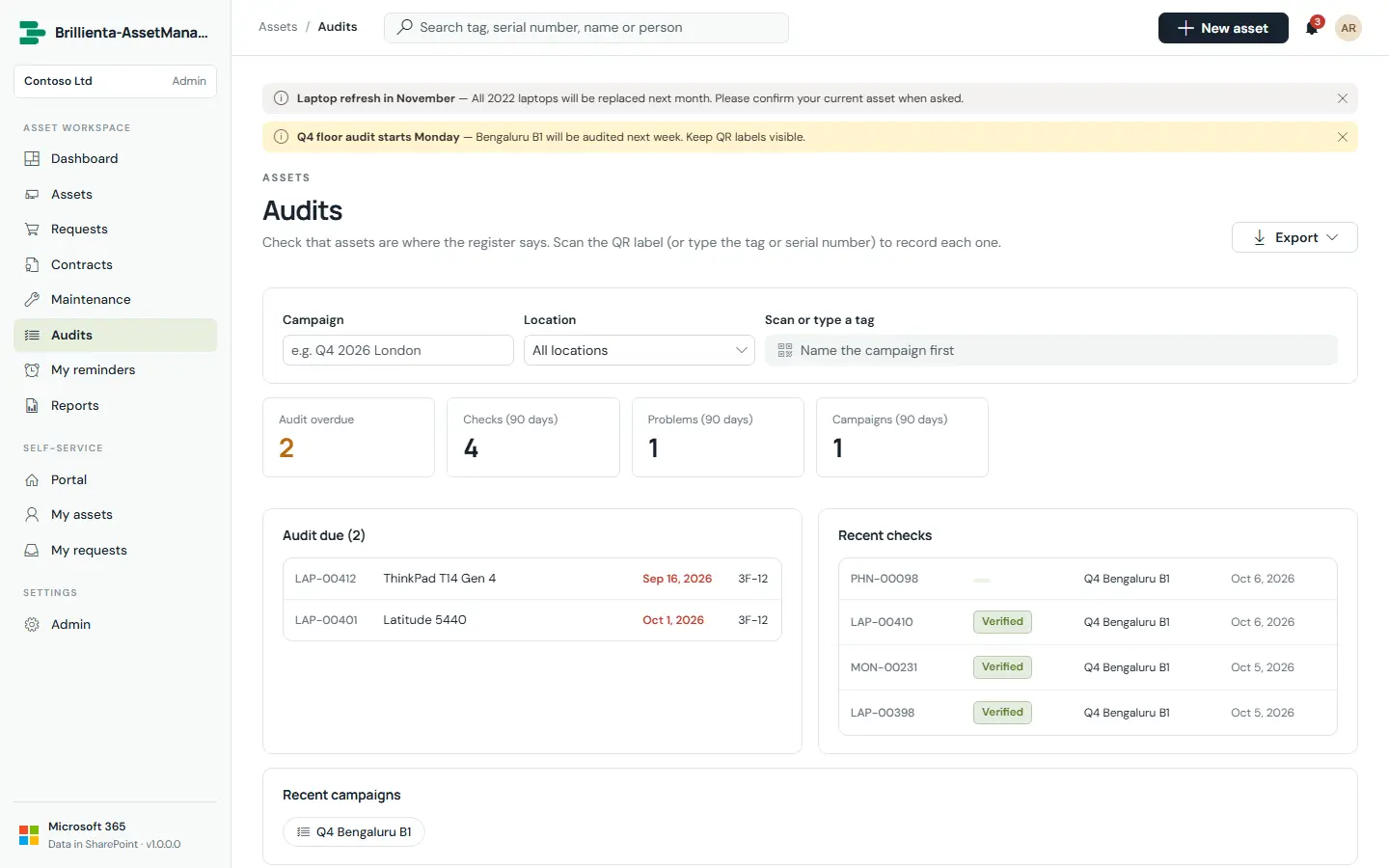
Location campaigns: walk the floor scanning each QR label — the code opens the asset — or type the tag or serial to record Verified. A wrong location is corrected automatically; “record the rest as missing” finishes the campaign.
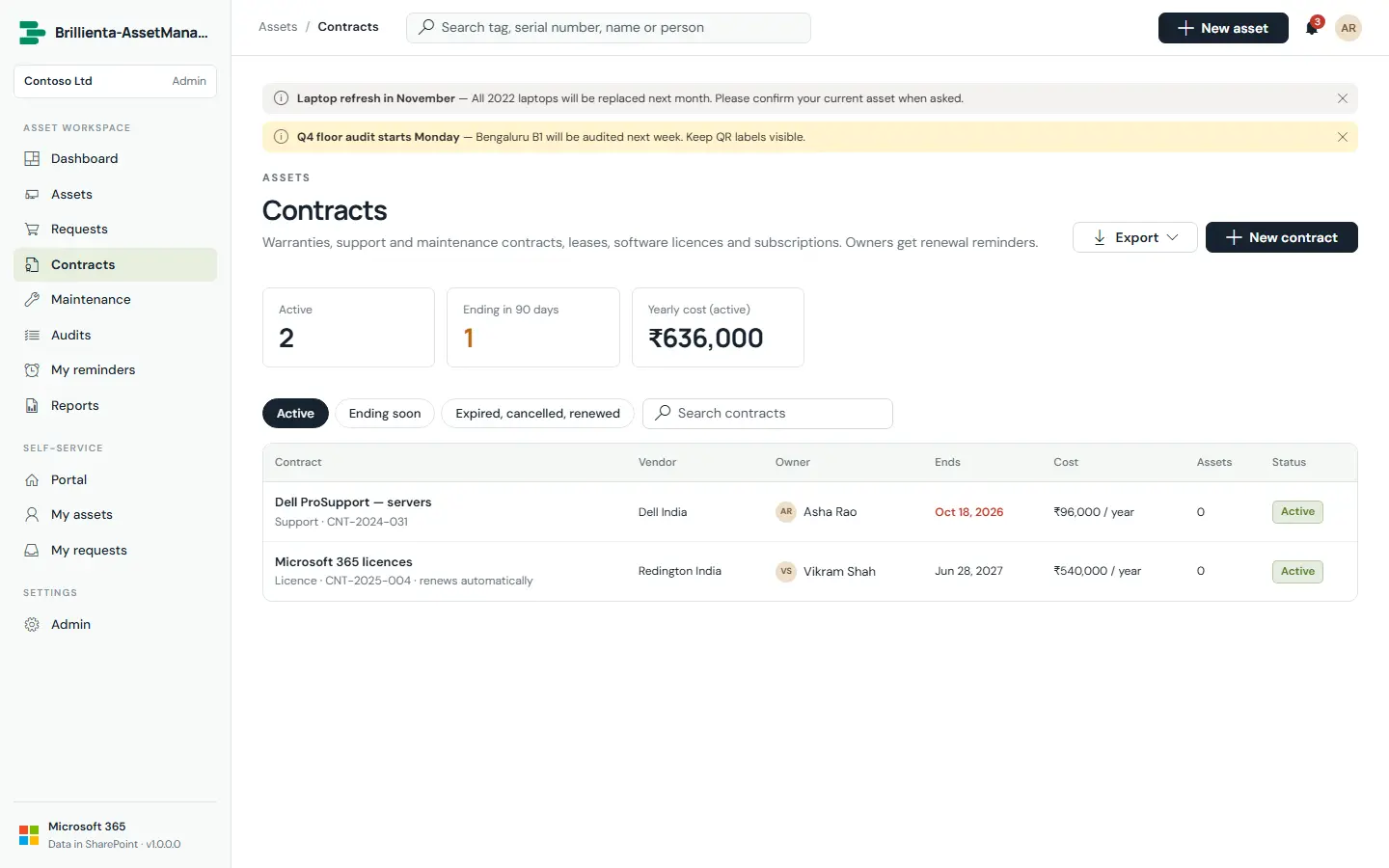
Warranties, support, leases, licences and subscriptions with vendor, owner, dates, cost, billing cycle, seats, auto-renew and linked assets. Depreciation runs per type — straight-line or double-declining balance — and shows as book value and a schedule.
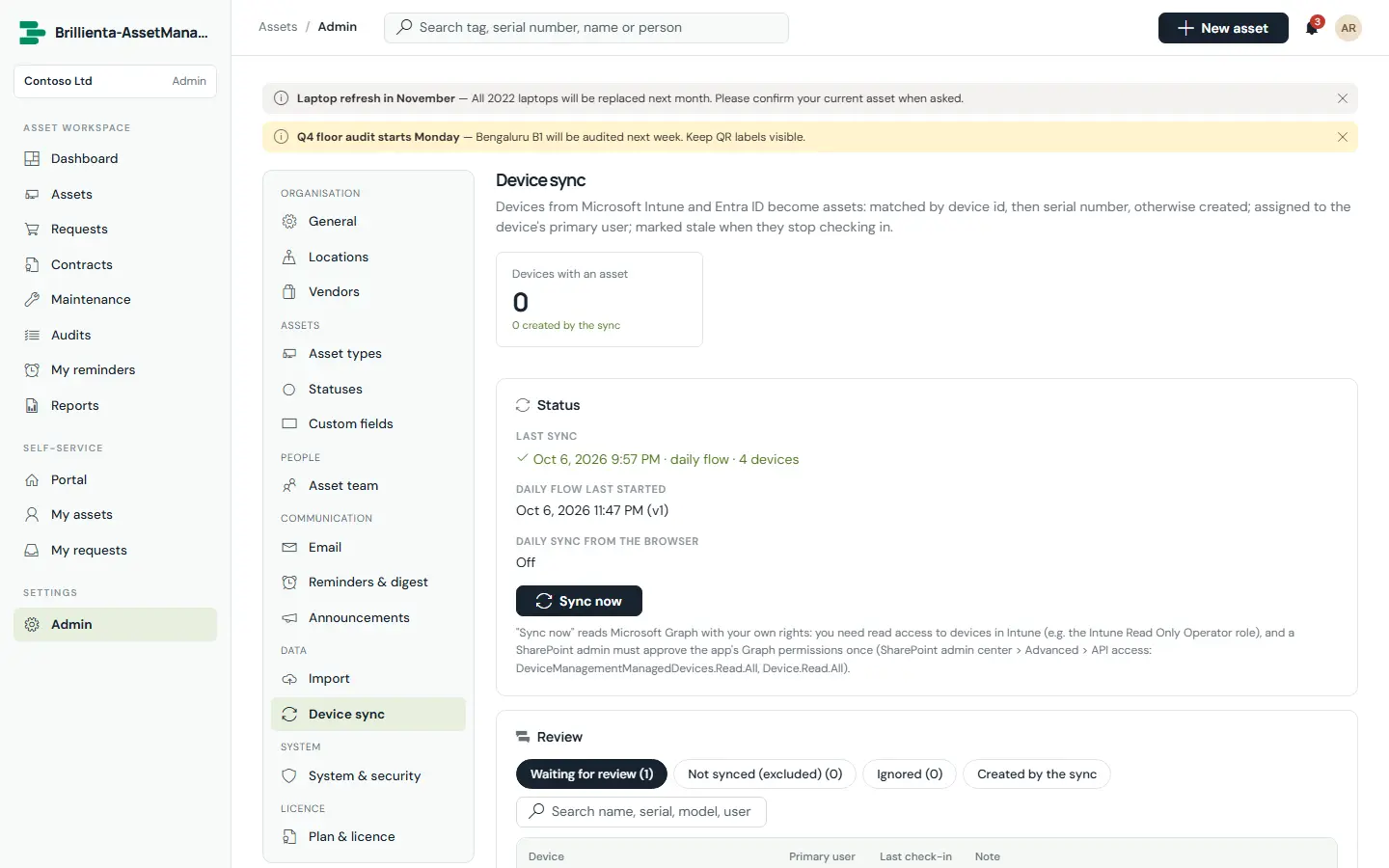
Intune managed devices — and optionally Entra ID devices — become assets: matched by device id, then serial, otherwise created or left for review. New assets are assigned to the device’s primary user; compliance and last check-in land on the asset.
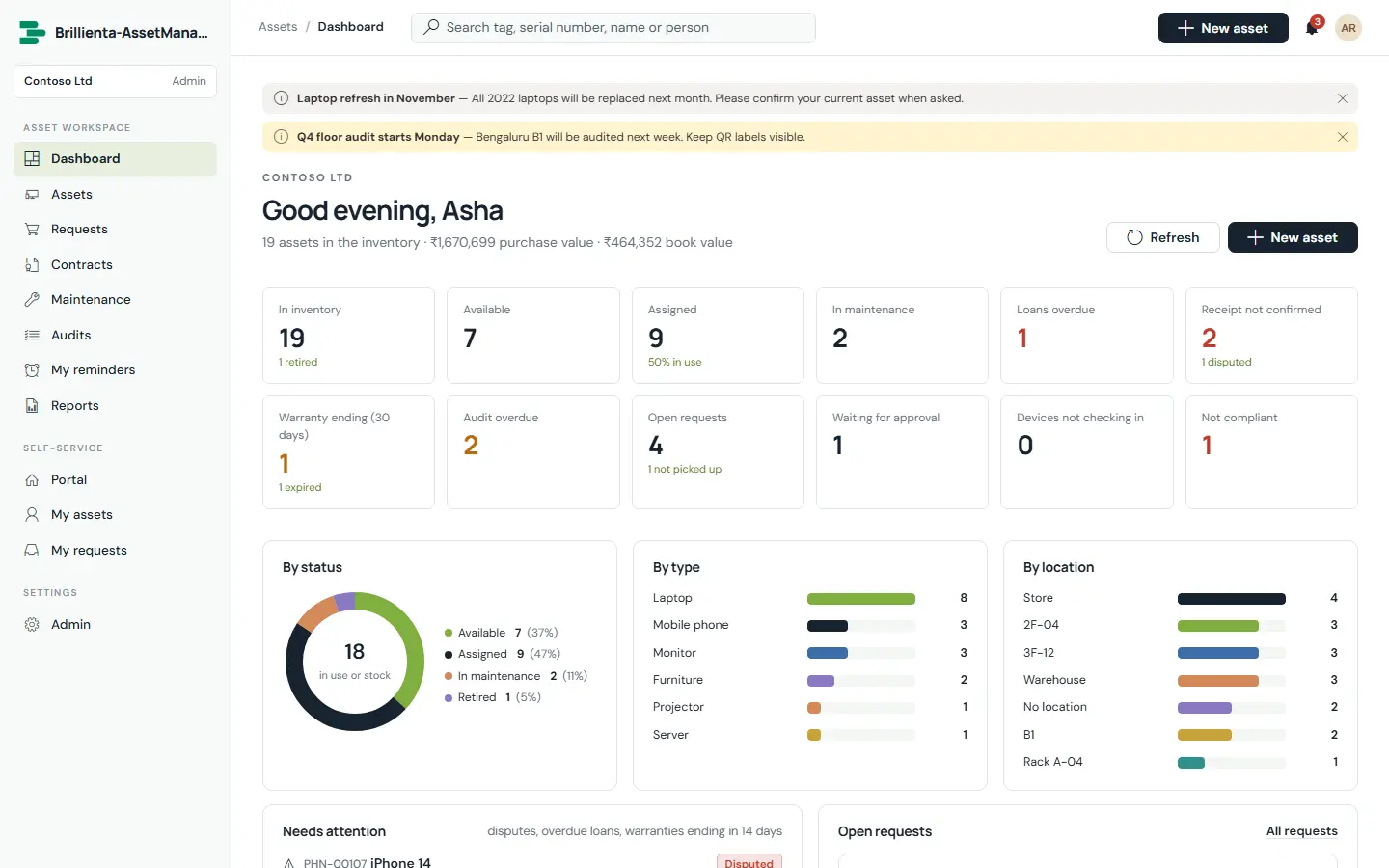
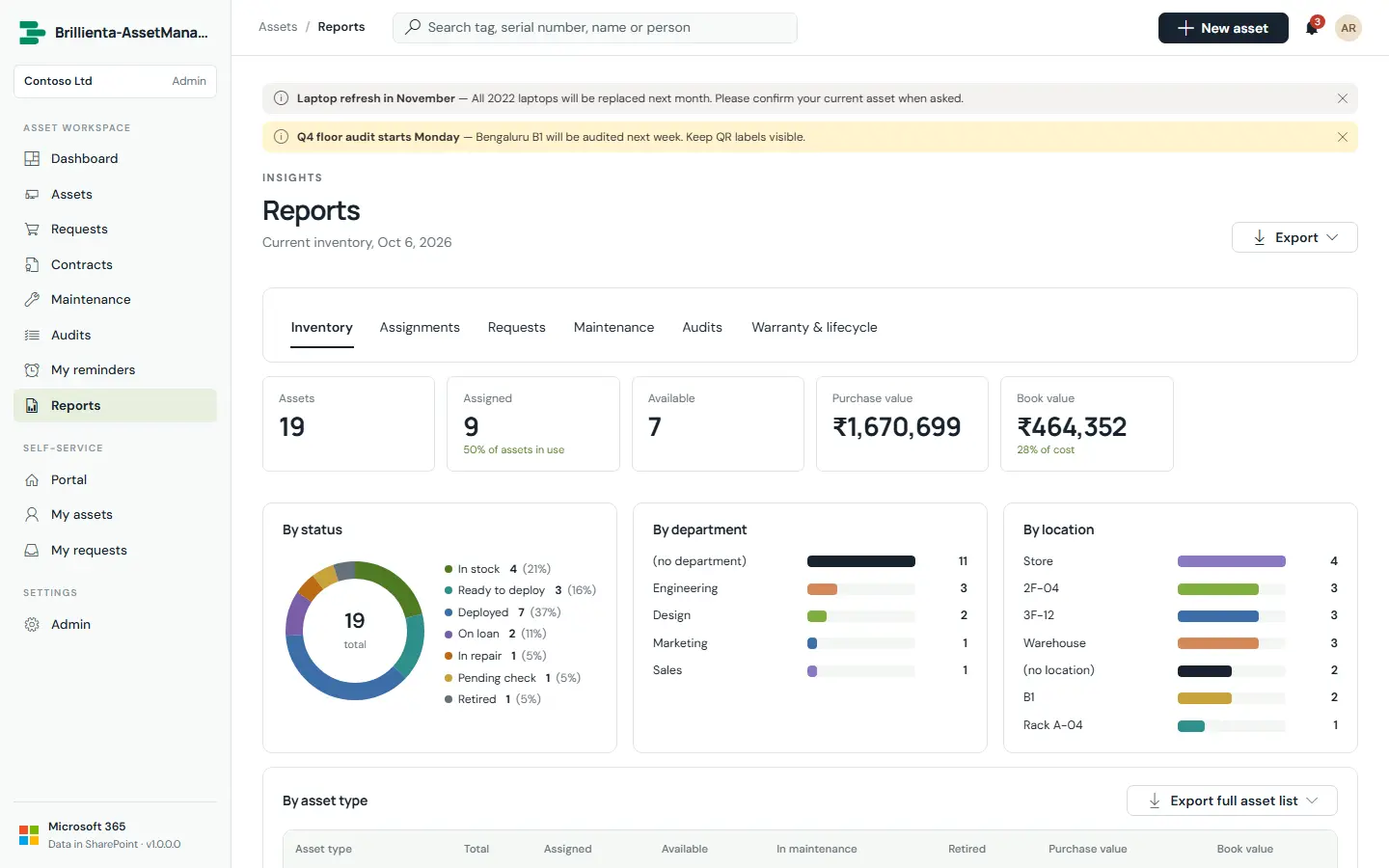
Clickable KPIs and a “Needs attention” list: disputes, overdue loans, warranties ending in 14 days.
Inventory by type, assignments, requests, maintenance spend, audit coverage, warranty and lifecycle.
Validate-first CSV import, matched by name and synonyms, with update-by-tag-or-serial.
Loans, receipts, approvals, fulfilment and renewals, plus a weekday digest for the team.
A bell with the 30 latest notifications, plus 24 email events with your logo.
Banners for everyone or the asset team, inside a time window.
Extra fields per asset type (Pro).
/ search, n new, g then a letter to jump between pages.
HOW IT WORKS
No server, database or Azure function. The app runs as the signed-in person and reads and writes only your site.
Runs in the browser as the signed-in user, full screen, with a phone layout.
Hidden lists with the prefix AM_: assets, assignments, acknowledgements, requests, maintenance, audits, contracts, devices and more.
Email from the asset team mailbox, reminders & digest on a schedule, and daily device sync.
| Microsoft Graph permission | Used for |
|---|---|
DeviceManagementManagedDevices.Read.All | Reading Intune managed devices for “Sync now” |
Device.Read.All | Reading Entra ID devices for “Sync now” |
Delegated permissions, approved once by an administrator in the SharePoint admin center. If one isn’t approved, only that feature is unavailable.
ADMINISTRATION
Admins change everything in the app’s own Admin pages, with validation before anything saves.
Branding, numbering, currency, time zone, features, check-out defaults and maintenance mode.
Nested locations and the vendor list used across assets, maintenance and contracts.
Tag prefixes, intervals, depreciation, approval rules — and statuses tied to six fixed kinds.
Extra fields per asset type, used in views, import and reports.
Admins, managers and auditors; auditors are read-only and free.
Flow download, delivery overview, test send, 24 templates with preview, reminder timings and digest.
CSV import and device sync settings, exclusions and type rules.
On-demand validation, Apply security, flow health and plan & licence.
ROLES & PERMISSIONS
The role decides what the screens offer; SharePoint permissions, set up by the app, decide what can actually be read and changed. Features also depend on the plan.
| Capability | Employee | Auditor | Manager | Admin |
|---|---|---|---|---|
| Portal: my assets, requests, approvals, receipt confirmation | ✓ | ✓ | ✓ | ✓ |
| Assets: view, create, check-out / in, bulk, export, labels | Own | View | ✓ | ✓ |
| Requests: triage, fulfil, close | Own | View | ✓ | ✓ |
| Maintenance, audits, contracts | — | View | ✓ | ✓ |
| Vendors, announcements, import, device sync review | — | — | ✓ | ✓ |
| Settings, security, flows, licence | — | — | — | ✓ |
SECURITY
All data lives in your SharePoint site and moves only through SharePoint and your own flows. There is no analytics, tracking or vendor cloud.
Security & your data ↗PRICING
One flat price per tenant — not per user. Start with a 14-day trial of every feature, then pick the plan that fits.
Asset register, assignments, employee portal and requests, reminders and reports
billed yearly · $348 / year
≈ $5.80 per asset manager per month at full seats
Approvals, maintenance, audits, contracts, depreciation, labels, digests and custom fields
billed yearly · $1,188 / year
≈ $3.96 per asset manager per month at full seats
Everything in Plus, plus:
Microsoft Intune and Entra ID device sync, and unlimited asset managers
billed yearly · $2,988 / year
Flat price — no per-asset manager charges
Everything in Pro, plus:
Prices in USD per Microsoft 365 tenant, excluding taxes. Seats count asset admins and managers. Employees and auditors are free. Every installation starts with a 14-day trial of all Enterprise features — no card needed. Larger seat counts and multi-year terms: talk to us.
| Feature | Plus | Pro | Enterprise |
|---|---|---|---|
| Asset register: types, statuses, locations, vendors, history | ✓ | ✓ | ✓ |
| Check-out, check-in, loans and receipt confirmation | ✓ | ✓ | ✓ |
| Employee portal: my assets, requests, returns and issues | ✓ | ✓ | ✓ |
| Email notifications (standard templates) | ✓ | ✓ | ✓ |
| Dashboard, reports and Excel / PDF exports | ✓ | ✓ | ✓ |
| Import assets from CSV (e.g. saved from Excel) | ✓ | ✓ | ✓ |
| Personal reminders | ✓ | ✓ | ✓ |
| Return-due and overdue reminders for loans | ✓ | ✓ | ✓ |
| Announcements | ✓ | ✓ | ✓ |
| Request approvals (manager or named approver) | — | ✓ | ✓ |
| Custom fields per asset type | — | ✓ | ✓ |
| Maintenance and repairs | — | ✓ | ✓ |
| Physical audits | — | ✓ | ✓ |
| Contracts, licences and renewal reminders | — | ✓ | ✓ |
| Depreciation and book values | — | ✓ | ✓ |
| QR code asset labels | — | ✓ | ✓ |
| Custom email templates | — | ✓ | ✓ |
| Receipt, approval and fulfilment reminders, daily digest | — | ✓ | ✓ |
| Microsoft Intune / Entra ID device sync (manual and daily) | — | — | ✓ |
SUITE BUNDLE
HRMS, Helpdesk, Asset Management, Employee Directory and TaskManager — each on its Pro plan.
DEPLOYMENT
Most of the time goes on choosing the site and the people for each role.
Add asset-management.sppkg to the app catalog and deploy it.
Only if you will use browser device sync — in SharePoint admin center › API access.
Add Brillienta Asset Management to a full-width page, or as a Teams tab.
Organisation, mailbox, time zone, currency, numbering, the asset team, starter content and security.
Import email, reminders and device sync flows, turn them on and paste your licence key.
Yes — save it as CSV and drop it in. Every row is validated before anything is written, and assets with the same tag or serial can be updated.
No. Seats count asset admins and managers; employees use the portal and auditors are free.
No. Approvals are checked against SharePoint version history and receipts against Created By before anything happens.
Only for device sync (Enterprise). Everything else works without it.
It stays in your SharePoint lists, exportable to Excel or PDF at any time.
RESOURCES
The complete documentation, our security model and practical articles for Brillienta Asset Management.
TRY IT ON YOUR TENANT